Description
Ohio University Libraries collaborated with OIT to incorporate the Libraries’ Subject and Course Guides into Canvas. Including Library Guides, or LibGuides, in your course is a great way to provide discipline-specific research help to your students throughout your course.
Environment
Canvas via web browser
Solution
Embed Library Guides directly into your course, either by using the Library Resources link in the Canvas course menu or embedding Library Guides into a module using the external tool feature.
Add Library Resources to your Canvas Course Menu
You can edit the Library Resources link in your Canvas course(s). Currently, the default setting for the Library Resources link in the menu of every Canvas course goes to a page with information about how to contact a librarian, the online chat service, the hours the various library locations are open, and links to short videos and pages about how to use library databases and resources:
- By default, all course menus include Library Resources. If it is missing and you need to re-enable it by updating course navigation links.
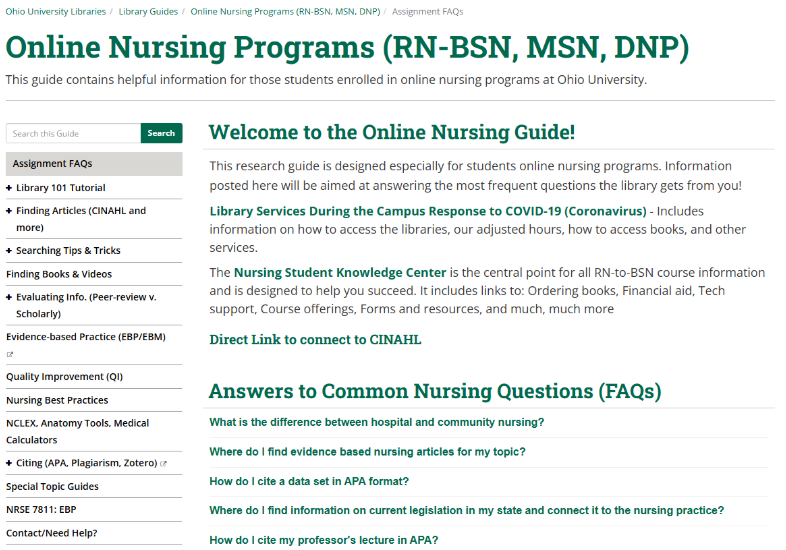
- Optional: You can customize these resources to a customized page with content specific to the needs of your students and that is more relevant to the discipline you are teaching by contacting the librarian that represents your subject area. Below is an example of a focused Guide: the Online Nursing Programs (RN-BSN, MSN, DNP) Guide created by Health Sciences Librarian, Hanna Schmillen. Ohio University Libraries maintains a large bank of pre-made LibGuides as well, so there may be one (or more!) that could be embedded immediately.
Add Library Guides to a Module in Canvas
You can embed a Library Guide directly into a module in Canvas. This works well if you’d like to utilize multiple Library Guides throughout the semester, placing relevant Guides in different modules. Using another pre-made Library Guide as an example, below is a Library Guide is embedded into a module.
In this example, a student selects the module titled ‘ORCiD’ and sees that there are four pieces of content. The fourth piece is the Guide for Nursing. Let’s say this module is the assignment for week ten and involves nurses writing a research paper. In addition to a sample paper, or a chapter from a book about literature reviews, the instructor could add this Guide, created by Hanna Schmillen, that helps researchers in nursing find articles and use the citation management software, Zotero.

Get Help from University Libraries
Contact your subject librarian or reach out directly to the Head of Learning Services, Chris Guder
Get Help From Canvas
- Live chat with Canvas support (Faculty)
- Get 24-hours/7-days a week Canvas support
- Dial the Canvas Support Hotline number located under "Get Help" in the Canvas Global Navigation Menu
- Contact OIT at 740‑593‑1222 if you need help logging in, accessing test or practice courses, or using tools that connect to Canvas.
Get Help From OIT