Summary
Canvas gets regular updates from the vendor like like most cloud-hosted applications. These updates might include new features, feature or interface enhancements, bug fixes for existing features, or things like security updates. Canvas refers to these updates as Deploy or Release updates.
Sources for Updates
Release and Deploy Notes
Deploy updates happen every other Wednesday. These include changes aimed at bug fixes, performance updates, minor updates to the user interface, and preparations for new feature releases.
Release updates happen on the third Saturday of each month. These include new features and any major updates to the user interface.
A summary of these updates can be found in the Get Help menu within Canvas where they will be listed as Instructor Role Updates. Notes will include a date that those changes are/were scheduled to take place. If you select the Instructor Role Updates title within the Get Help screen, it will open the corresponding Deploy or Release Notes pages in a new browser tab or window. These pages have more detailed information about the changes, often including screenshots or video demonstrations. On these Release and Deploy Notes pages, there is an indicator above each change that shows who the change applies to, for example: Admin, All Users, Students, Instructor. See below for a screenshot of how the notes display within the Get Help menu.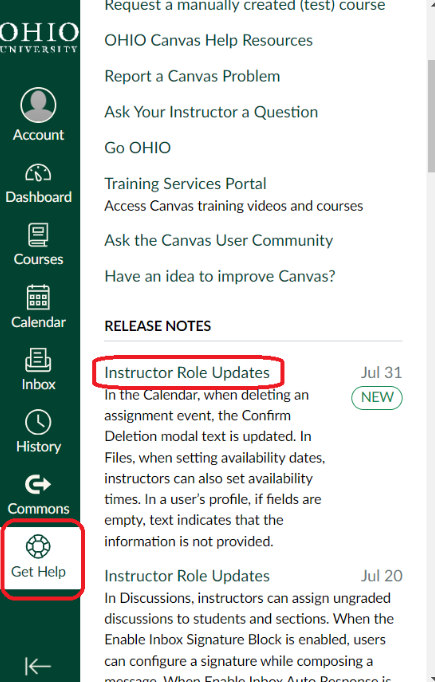
Please note that these summaries and notes will sometimes refer to products or features not available in our instance of Canvas. For example, the August 2024 Release Notes speak about an enhancement to the Lucid integration for Canvas, and this is not available in OHIO’s Canvas environment. They may also reference items that are being released as Feature Previews, where instructors have the option to preview ia new feature by updating their course settings. See below for more information about Feature Previews.
Feature Previews
Sometimes Canvas will make a feature available within the system while it is still in development. They call these Feature Previews. They make these available early for two primary reasons: so that users can have access to that enhanced functionality as soon as reasonably possible and to gather feedback on these changes to shape their final results.
OIT's Canvas Administrators will perform a risk assessment on each of these new Feature Previews. If the item is deemed low risk, we will make it available for instructors to use at their discretion. If the item in its Feature Preview state is deemed to be moderate or high risk, it will remain unavailable until enough improvements are made for that risk level to be low. It is important to note that if you choose to use a Feature Preview in your course, it is subject to change while it has that Feature Preview label attached to it. Additionally, Canvas may ask for your feedback on that feature.
Ideas for Improvement
Many of the enhancements and new features that are made available in Canvas came from customer requests for improvements. If you have an idea for an improvement or new feature within Canvas, you can submit those requests directly to the vendor. Inside Canvas, if you select the Get Help option from the main menu, you will see an option that says, “Have an idea to improve Canvas?”. If you select that option, you will be able to submit your recommendations.
Summary
Canvas receives regular updates from the vendor including Release and Deploy updates (new features, enhancements, bug fixes, and security updates), and Feature Previews (early access features still in development from the vendor). If you’re looking for a specific feature, function, or fix that Canvas does not currently provide, you can submit ideas for improvement that the vendor reviews regularly.
Additional resources
Join the Teaching and Learning Technologies Advisory Community
Get help
- Visit the Technology Help Center (help.ohio.edu) to get live support, view outages, and browse trainings.